Frequently Asked Questions
I've wired my AIS output to the AIS port of the multiplexer. I can see the AIS information on my tablet that is connected to the WIFI of the multiplexer, but I need to have the AIS information on my chart plotter too. How can I do this?
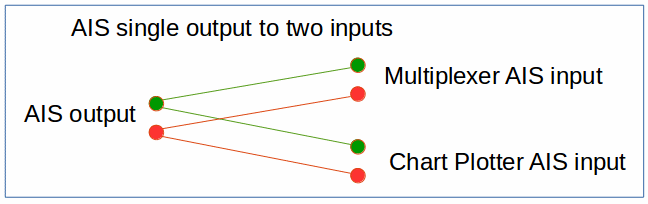
The nature of NMEA0183 (and the AIS data too) is that you cannot wire two outputs together into one input; that's why you need to have a multiplexer to combine the data. However, you can wire one output into two different inputs with no problem. In order to get your AIS information on both the multiplexer and your chart plotter (or other device), run two sets of wires from the AIS output: one to the multiplexer AIS input and one to the AIS input of your other device.
I've changed the password on my multiplexer, but forgotten what it is. How can I retrieve it?
There is no way to retrieve the password. In this case, your only option is to do a factory reset and then set the multiplexer parameters as required.
I can connect my computer to the multiplexer, but I've changed the Multiplexer IP Address and can't remember what I set it to, so I can't get to the setup screen. What do I do now?
On any computer connected to the multiplexer, look at the IP address assigned to that computer. Exactly how to do this varies by operating system, but it is generally found in the properties of the active network connection. Use that IP address to access the setup page, except replace the last octet with the number 1. For example, if the assigned address is 192.168.4.3, use 192.168.4.1 to access the setup page.
Another option is to do a factory reset and start over.